
PROPFRAMEJoin waitlist

Media operations, built for property

Every property shoot.
Finally in frame.

Request, coordinate, review, and reuse real estate media from one focused workspace—across every property and every stage.

One workflow for teams and media professionals
OverviewRequestsLibraryJL
PROPERTY WORKSPACENorthline Residences
● On track
LOCATIONHarbor DistrictPHASELaunch campaignNEXT SHOOTSep 12 · 8:30 AM
Active request•••
EXTERIOR + DRONELaunch campaign
RequestedScheduledIn review
MP
ASSIGNED TOMara Park · Aerial / Photo
View brief →
Recent delivery18 assets
✓ 12 approved6 in review
STATUS UPDATEDDelivery approved

The problem isn't the work

Great media gets lost in bad operations.

Briefs in email. Shoot details in texts. Feedback in screenshots. Final files in a mystery folder. PROPFRAME replaces the patchwork with a workflow made for property media.

THE OLD WAY

Scattered by default

  • Email threadsBriefs, revisions, approvals
  • SpreadsheetsDates, owners, deliverables
  • Shared drivesDrafts mixed with finals
WITH PROPFRAME

One continuous record

RequestScheduleReviewReuse
NL

Northline ResidencesEverything tied to the property

236 assets

One workflow. Start to finish.

The operational layer your media deserves.

Every handoff is designed around how property content is actually requested, produced, approved, and used again.

01

Property workspaces

A living record for every property.

Keep project context, brand direction, media history, and the people responsible in one focused workspace.

From first foundation to final campaign.
01 / 08
Northline ResidencesActive
NR / 03Multifamily · Harbor District
PHASELaunchREQUESTS08ASSETS236
ASSIGNED TEAMMPAR+2
02

Media requests

Brief once. Start aligned.

Turn deliverables, references, deadlines, and site instructions into a clear brief everyone can act on.

Fewer clarification loops. Better first drafts.
02 / 08
New media requestDraft
✓ Pending review
03

Discovery & assignment

Find the right eye for the work.

Compare specialists by service area, availability, and portfolio focus—then assign with the full project context intact.

Real estate specialists, not a generic talent feed.
03 / 08
Available near Harbor District12 matches
MP

Mara ParkArchitecture · AerialView profile

+
EL

Evan LaneInteriors · VideoSelected

SK

Soren KimProgress · DroneView profile

+
92%

Strong matchAvailable · 4.8 rating · 18 similar shoots

04

Scheduling

Lock the shoot. Keep the details close.

Confirm date, time, access notes, and the on-site contact without another chain of messages.

One confirmed plan for everyone involved.
04 / 08
September 2026Today →
MTWTFSS
789101112131415161718192021222324252627

SHOOT CONFIRMEDSep 17 · 8:30 AMSite contact: Jordan Lee

05

Upload & delivery

Drafts, finals, and versions—clearly delivered.

Media professionals upload directly to the request, with visible progress and an unmistakable review state.

Every delivery lands where it belongs.
05 / 08
18 files addedHigh-resolution JPG · 428 MB

northline_hero_01.jpg

100%

amenity_dusk_04.jpg

86%

drone_west_02.jpg

62%
Delivery type
DraftFinal
06

Review & approval

Feedback that moves work forward.

Comment on the asset, request a precise revision, or approve the final in one focused review loop.

Decisions stay attached to the work.
06 / 08
1
Jordan Lee

Can we soften the sky on this version?

northline_exterior_v3.jpg
Approved
07

Media library

Approved once. Useful for years.

Search approved assets by property, phase, format, usage, or campaign and bring the right media back into play.

Your property archive becomes an active resource.
07 / 08
Search Northline media...⌘ K
All assetsExteriorAmenitiesDrone
✓ APPROVEDExterior
Amenity
Drone
Interior
Progress
Detail
08

Lifecycle tracking

Know what happened—and what comes next.

Follow every request from draft to archive, with revisions, approvals, and handoffs visible along the way.

A clear media history across the property lifecycle.
08 / 08
Request #PF-1842View activity
NL

NORTHLINE RESIDENCESLaunch campaign media

Approved
Draft
Scheduled
In production
Submitted
Revision
Approved
Archived

Final delivery approvedToday at 2:14 PM · by Jordan Lee

How it works

From idea to approved asset.

A clear path for the entire team, with the right context present at every step.

  1. 01Create a property
  2. 02Request media
  3. 03Assign a specialist
  4. 04Schedule the shoot
  5. 05Review & approve
  6. 06Reuse from the library
01

For companies

Turn recurring shoots into a reliable operation.

Give every property a home base for briefs, schedules, reviews, rights, and approved assets—without chasing another thread.

  • Centralize media requests
  • Coordinate trusted professionals
  • Approve with clear feedback
  • Reuse assets with confidence
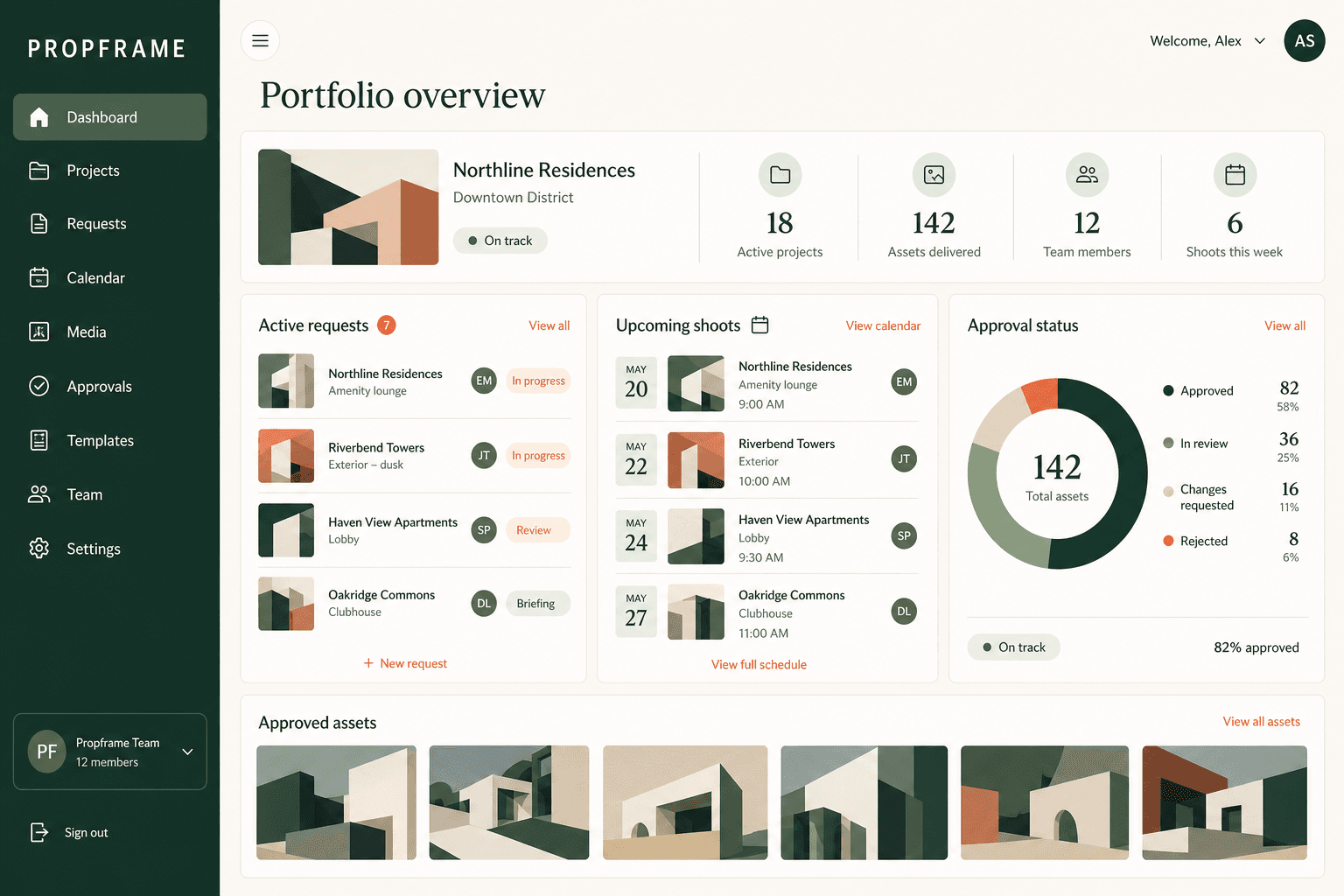
PROPFRAME company dashboard showing projects, media requests, upcoming shoots, approval status, and approved assets

The value compounds

Your media library should outlive the campaign.

PROPFRAME preserves every approved asset, version, tag, and usage right by property—so the next campaign starts with context, not a scavenger hunt.

Rights attachedUsage, duration, attributionHistory preservedVersions, notes, approvalsReady to reuseSearchable across campaigns
APPROVED
northline_hero_01.jpg
USAGE RIGHTSCampaign + socialActive
LICENSE WINDOWPerpetual
ATTRIBUTIONNot required
PROPERTYNorthline Residences

Built for the work behind

01Residential02Commercial03Multifamily04Construction progress05Luxury listings06Hospitality

Early access

Help shape the future of property media operations.

Join the waitlist for product updates and a chance to be among the first companies and media professionals invited in.

01

Built with the industryYour interest helps us prioritize what matters most.

02

No commitment requiredJust a thoughtful line of communication as we build.

I am a...

No spam. Just thoughtful launch updates and early-access invitations.